外挂式插件编程思路【敏捷框架篇】(13)
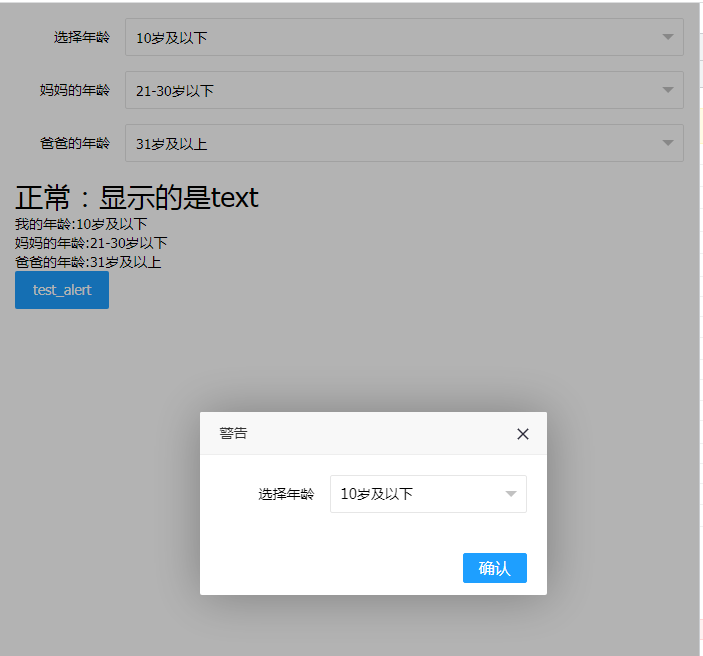
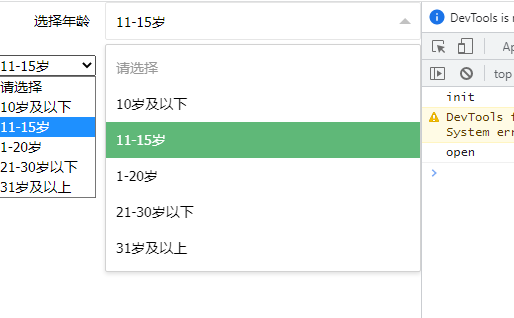
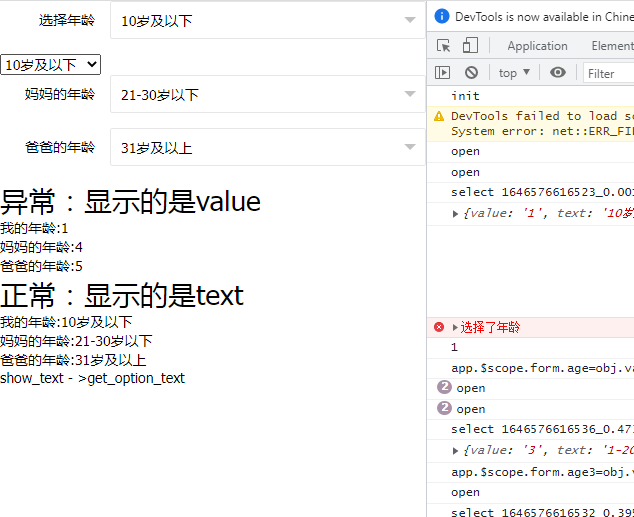
zhaoshao.alert支持zs-select,结合才是一个相对复杂的应用场景。
【index.html】
<!DOCTYPE html>
<html ng-app="myApp"  ng-controller="myhtml">
	<head>
		<meta charset="utf-8" />
		<title>外挂式插件编程思路(敏捷框架篇)</title>
		<script src="jquery.min.js"></script>
		<script src="angular.min.js"></script>
		<script src="ZaShao.js"></script>
		<script src="app.js"></script>

		<link rel="stylesheet" href="css/layui.css" media="all">
		<link rel="stylesheet" href="css/layer/default/layer.css" media="all">
		<style>

			.layui-click-shade {position:fixed; background: rgba(0,0,0,0.02); top:0;left:0; width:100%; height:100%;  z-index: 808; display: none;}
			.layui-form-selected .layui-click-shade {display: block;}


		</style>
	</head>
	<body>
		<div style="padding: 15px;">
			<form class="layui-form">
				<!-- 框架需要有自定义的语法 -->
				<zs zs-type="select" zs-option="option" zs-model="form.age" zs-change="age_change" zs-title="选择年龄" zs-placeholder="请选择"></zs>

			</form>


			<form class="layui-form">
				<!-- 框架需要有自定义的语法 -->
				<zs zs-type="select" zs-option="option" zs-model="form.age2" zs-change="" zs-title="妈妈的年龄" zs-placeholder="请选择"></zs>
				<zs zs-type="select" zs-option="option" zs-model="form.age3" zs-change="" zs-title="爸爸的年龄" zs-placeholder="请选择"></zs>
			</form>

			<div>
				<h1>正常:显示的是text</h1>
				我的年龄:<span ng-bind="get_option_text(option,form.age)"></span>
				<br>
				妈妈的年龄:<span ng-bind="get_option_text(option,form.age2)"></span>
				<br>
				爸爸的年龄:<span ng-bind="get_option_text(option,form.age3)"></span>

			</div>

			<button class="layui-btn layui-btn-normal" onclick="test_alert()">test_alert</button>
		</div>
		<script>


			var app=ng_app();
			app.init(function()
			{
				//tab标签相关
				app.$scope.form={
					age:''
				};
				app.$scope.option=[
					{value:'1',text:'10岁及以下'},
					{value:'2',text:'11-15岁'},
					{value:'3',text:'1-20岁'},
					{value:'4',text:'21-30岁以下'},
					{value:'5',text:'31岁及以上'},

				];
				app.$scope.age_change=function(option)
				{
					console.error('选择了年龄');
					console.log(option);
				}


				app.update();//页面渲染
			});

			function test_alert()
			{
				zashao.alert({
					title:'警告',
					content:'<zs zs-type="select" zs-option="option" zs-model="form.age" zs-change="age_change" zs-title="选择年龄" zs-placeholder="请选择"></zs>',
					btn:'确认'
				});
			}
		</script>

	</body>
</html>
【app.js】
var zashao;

function ng_app()
{
	var MyApp=
	{
		app:null,
		init:function(back)
		{
			console.log('init');
			var me=this;
			var app = angular.module('myApp',[]);
			app.controller("myhtml",function($scope, $http,$window,$compile)
			{

				me.$scope=$scope;
				me.$http=$http;
				me.$window=$window;
				me.$compile=$compile;
				$scope.get_option_text=function(option,value)
				{
					var text='';
					for(var i in option)
					{
						if(option[i].value==value)
						{
							text=option[i].text;
							break;
						}
					}
					return text;
				}

				zashao=new ZaShao({jquery:$,app:me});

				back();
			});

			this.app=app;
		}

		//更新模板渲染 优化避免报错,同时又要支持到同步
		,update:function(){
			var me=this;
				try{
					if(!me.$scope.$$phase) me.$scope.$apply();
					//me.$scope.$applyAsync();
				}catch(e){}
		},
		//配合jq使用,jq后的模板,重新渲染
		html:function(html)
		{
			var that=this;
			try{
				var result=that.$compile(html)(that.$scope);
				if(result.selector)//假设存在 this_tpl_new.selector 则认为ng变量不存在失败了
				{
					//console.error(this_tpl_new.selector);
					var result=html;
				}
			}catch(e){
				var result=html;
			}
			return result;

		},
		new:function(){
			return this;
		}

	}
	var result=MyApp.new();
	return result;
};
【ZaShao.js】
/**
 *  框架化
 * */

function ZaShao(option)
{
	var $=option.jquery;
	var app=option.app;
	var $this=null;//新增this 解决this传递问题

	var zashao=
	{
		load_select:function()
		{
			//所有select的渲染对象
			app.$scope.render_select={
				data:{},
				open:function(id)
				{
					console.log('open',id);
					if(!app.$scope.render_select.data[id].open)
					{
						app.$scope.render_select.data[id].open=true;
					}else{
						app.$scope.render_select.data[id].open=false;
					}
				},
				close:function(id)
				{
					app.$scope.render_select.data[id].open=false;
				},
				select:function(id,obj)
				{
					console.log('select',id);
					console.log(obj);
					let this_model=app.$scope.render_select.data[id].model;
					let this_change=app.$scope.render_select.data[id].change;

					if(this_change)
					{
						let eval_change=`
						if(obj.value != app.$scope.${this_model})
						{
							if(app.$scope.${this_change}) app.$scope.${this_change}(obj.value);
						}
						`;
						console.log(eval_change);
						eval(eval_change);
					}
					let eval_model=`app.$scope.${this_model}=obj.value;`;
					eval(eval_model);
					console.log(eval_model);
					app.$scope.render_select.data[id].open=false;
				}
			};
			$this.render.select();
			app.update();
		},
		render:{
			select:function()
			{
				$('zs[zs-type="select"]').each(function(){
					var $jq_this=$(this);
					console.log($jq_this);
					var this_model=$jq_this.attr("zs-model");
					var this_option=$jq_this.attr("zs-option");
					var this_change=$jq_this.attr("zs-change");
					var this_title=$jq_this.attr("zs-title");
					var this_placeholder=$jq_this.attr("zs-placeholder");
					var this_id=(new Date()).valueOf()+'_'+Math.random();
					//当前select的渲染对象
					app.$scope.render_select.data[this_id]={
						open:false,
						model:this_model,
						change:this_change
					};


					var this_select_html=`
						<div class="layui-form-item" id="${this_id}">
							<label class="layui-form-label">${this_title}</label>
							<div class="layui-input-block">
							  <div class="layui-unselect layui-form-select {{render_select.data['${this_id}'].open==true ? 'layui-form-selected' : ''}}">
								<div class="layui-select-title" ng-click="render_select.open('${this_id}')">
									<input type="text" placeholder="${this_placeholder}" ng-attr-value="{{get_option_text(${this_option},${this_model})}}" readonly="" class="layui-input layui-unselect">
									<i class="layui-edge"></i>
								</div>
								<div class="layui-click-shade" ng-click="render_select.close('${this_id}')"></div>
								<dl class="layui-anim layui-anim-upbit" style="">
									<dd lay-value="" class="layui-select-tips">${this_placeholder}</dd>
									<dd lay-value="{{select_option.text.value}}" class="{{${this_model}==select_option.value ? 'layui-this' : ''}}" ng-repeat="select_option in ${this_option}" ng-click="render_select.select('${this_id}',select_option)">{{select_option.text}}</dd>

								</dl>
							  </div>
							</div>
						</div>
					`;
					$jq_this.before(app.html(this_select_html));
					$jq_this.remove();

				});
				app.update();
			}
		},

		//新增弹窗方法
		alert:function(option)
		{
			if(!app.$scope.render_alert) app.$scope.render_alert={
				data:{},
				close:function(id)
				{
					app.$scope.render_alert.data[id].open=false;
				},
			};

			if(!option) var option={};
			if(!option.title) option.title='提示';
			if(!option.content) option.content='提示内容';
			if(!option.btn) option.btn='确定';
			if(!option.close) option.close=function(){};
			var this_id=(new Date()).valueOf()+'_'+Math.random();

			app.$scope.render_alert.data[this_id]={
				open:true,
				option:option,
				close:function()
				{
					app.$scope.render_alert.data[this_id].open=false;
					option.close();
				}
			}


			var alert_html=`
				<div id="shade_${this_id}" class="layui-layer-shade" style="z-index: 19991021; background-color: rgb(0, 0, 0); opacity: 0.3;" ng-if="render_alert.data['${this_id}'].open==true"></div>
				<div id="alert_${this_id}" class="layui-layer layui-layer-dialog"  type="dialog" howtime="0" contype="string" style="z-index: 19991022; position: fixed; top: calc(50vh - 81px); left:calc(50vw - 150px);"  ng-if="render_alert.data['${this_id}'].open==true">
					<div class="layui-layer-title" style="cursor: move;">${option.title}</div>
					<div id="" class="layui-layer-content">${option.content}</div>
					<span class="layui-layer-setwin"><a class="layui-layer-ico layui-layer-close layui-layer-close1"  ng-click="render_alert.data['${this_id}'].close()"></a></span>
					<div class="layui-layer-btn layui-layer-btn-">
						<a class="layui-layer-btn0" ng-click="render_alert.data['${this_id}'].close()">${option.btn}</a>
					</div>
					<span class="layui-layer-resize"></span>
				</div>
			`;
			setTimeout(()=>{
				$("body").before(app.html(alert_html));
				app.update();//页面必须渲染后,才能支持到render.select
				$this.render.select();
				app.update();
			},10);


		},


		new:function(option){
			console.log('new');
			console.log(option);
			$this=this;

			this.option=option;
			this.load_select();


			return this;
		}

	}
	var result=zashao.new(option);
	return result;
};
优化了,css部分由于直接用的layui还有些问题,双向绑定已经实现。